把网页文件放在一个目录,就可以启动临时 HTTP 服务在本机预览。Windows 可以用自带的 Windows PowerShell,Linux 可以用已安装的 Python 3。
实现原理
浏览器请求静态文件,服务从指定目录读取文件并返回内容和媒体类型。下面的 PowerShell 示例只接受 GET 和 HEAD,访问目录时读取其中的 index.html。
Windows系统实现
在 www 目录旁创建 server.ps1。使用自己控制的目录,其内容在预览期间应保持稳定。示例在读取文件前逐级检查路径,并排除符号链接、目录联接和其他重解析点。
param(
    [ValidateRange(1, 65535)][int] $Port = 8080,
    [string] $WebPath = (Join-Path $PSScriptRoot 'www')
)

$root = Get-Item -LiteralPath $WebPath -ErrorAction Stop
if (-not $root.PSIsContainer -or
    ($root.Attributes -band [IO.FileAttributes]::ReparsePoint)) {
    throw 'Choose a regular directory as the site root.'
}

$rootPrefix = $root.FullName.TrimEnd([IO.Path]::DirectorySeparatorChar) + [IO.Path]::DirectorySeparatorChar

function Get-SiteFile([string] $RequestPath) {
    $item = $root
    foreach ($segment in $RequestPath.Trim('/').Split('/')) {
        if ($segment -eq '') { continue }
        if (-not $item.PSIsContainer -or $segment.EndsWith('.') -or
            $segment.EndsWith(' ') -or
            $segment.IndexOfAny([IO.Path]::GetInvalidFileNameChars()) -ge 0) {
            return
        }

        $candidate = [IO.Path]::GetFullPath((Join-Path $item.FullName $segment))
        if (-not $candidate.StartsWith($rootPrefix, [StringComparison]::OrdinalIgnoreCase)) {
            return
        }
        $item = Get-Item -LiteralPath $candidate -Force -ErrorAction SilentlyContinue
        if ($null -eq $item -or
            ($item.Attributes -band [IO.FileAttributes]::ReparsePoint)) {
            return
        }
    }

    if ($item.PSIsContainer) {
        $item = Get-Item -LiteralPath (Join-Path $item.FullName 'index.html') -Force -ErrorAction SilentlyContinue
    }
    if ($item -is [IO.FileInfo] -and
        -not ($item.Attributes -band [IO.FileAttributes]::ReparsePoint)) {
        $item
    }
}

Add-Type -AssemblyName System.Web
$listener = [Net.HttpListener]::new()
$url = "http://localhost:$Port/"
$listener.Prefixes.Add($url)

try {
    $listener.Start()
    Write-Host "Preview: $url"
    while ($listener.IsListening) {
        $context = $listener.GetContext()
        $response = $context.Response
        try {
            $method = $context.Request.HttpMethod
            if ($method -ne 'GET' -and $method -ne 'HEAD') {
                $response.StatusCode = 405
                $response.Headers['Allow'] = 'GET, HEAD'
                continue
            }

            $file = Get-SiteFile $context.Request.Url.LocalPath
            if ($null -eq $file) {
                $response.StatusCode = 404
                continue
            }

            $response.ContentType = [System.Web.MimeMapping]::GetMimeMapping($file.Name)
            $response.ContentLength64 = $file.Length
            if ($method -eq 'GET') {
                $stream = [IO.File]::OpenRead($file.FullName)
                try { $stream.CopyTo($response.OutputStream) }
                finally { $stream.Dispose() }
            }
        }
        catch {
            Write-Warning $_.Exception.Message
            $response.Abort()
        }
        finally {
            $response.Close()
        }
    }
}
finally {
    $listener.Close()
}
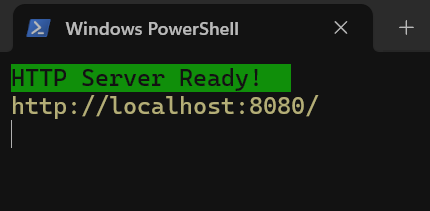
在 Windows PowerShell 中运行 .\server.ps1,再打开 http://localhost:8080/。可用 -Port 或 -WebPath 指定其他端口或目录。按 Ctrl+C 结束。旧版窗口示意如下。
Linux系统实现
在包含 www 的目录下运行下面的命令,再打开 http://127.0.0.1:8080/。--bind 将访问范围限制在本机,--directory 指定站点目录。Windows 若已安装 Python 3,也可将 python3 换成 py -3 后使用。
python3 -m http.server 8080 --bind 127.0.0.1 --directory www
http.server 适合临时预览自己的文件,并会跟随目录中的符号链接。参考 Python http.server 文档和 .NET HttpListenerResponse 文档。